Live in production

Expense claims that arrive already coded and checked

Staff snap a photo or forward a receipt by email. Orka's Expense Management tool reads it — supplier, date, amount, VAT — codes it against your chart of accounts, checks it against your policy, and hands your finance team an approval-ready report with every image attached.

Photo or email capture Coded to your chart of accounts Duplicates and out-of-policy claims flagged

“The tools Oli built have delivered significant value to our business, streamlining processes and saving considerable time.” — Rebecca Martins De Oliveira, W. H. Brakspear & Sons Ltd
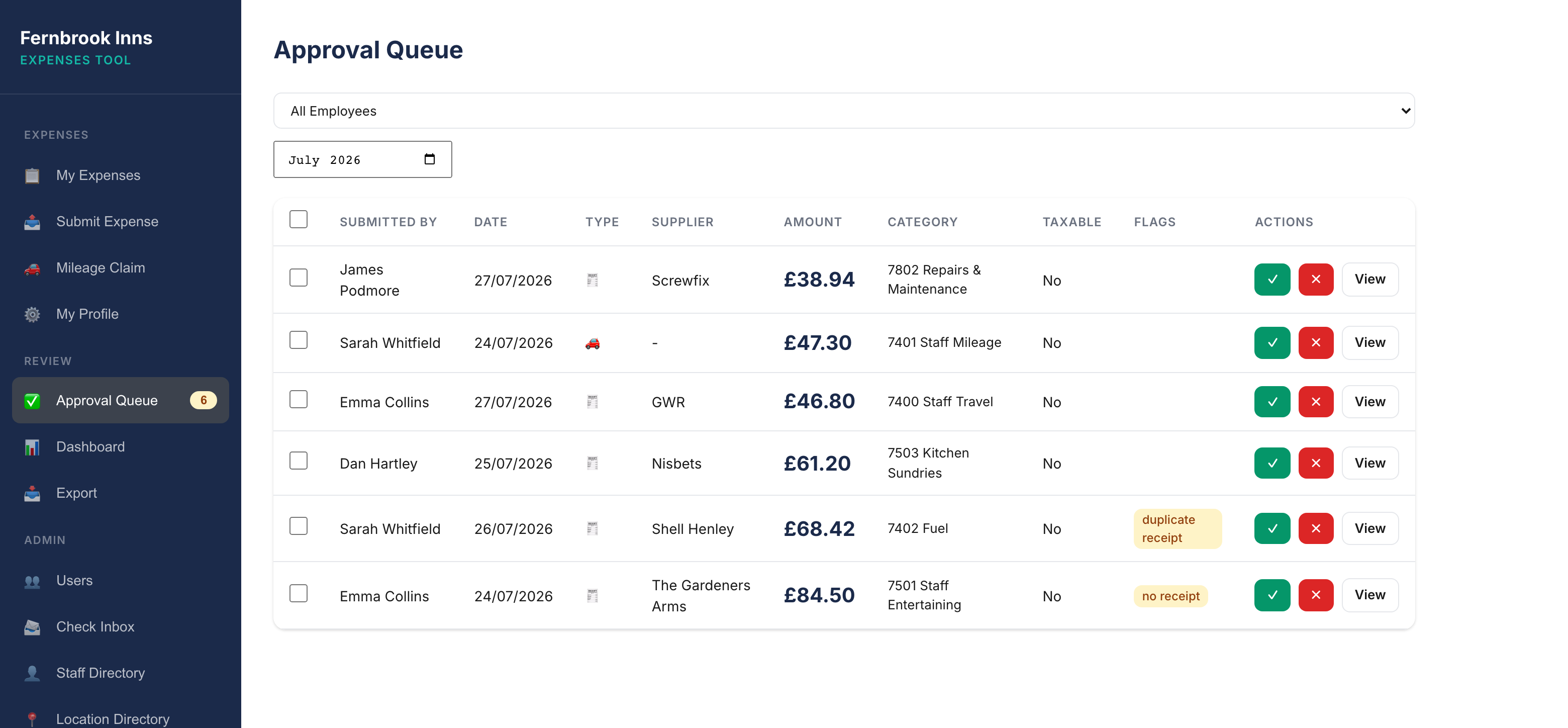
The expenses tool's approval queue: six claims from four staff members with dates, suppliers, amounts and account codes, one flagged as a possible duplicate receipt and one with no receipt attached, each with approve, reject and view buttons

The approval queue mid-month: every claim read, coded and policy-checked, two flagged for a human, the rest one click from approved. Real product — demonstration data.

Everyone hates expenses — especially the people processing them

Claims arrive on paper and by email, get checked by eye, keyed by hand and filed away — and they all land in the same crowded week.

Paper, email, and everything between

Crumpled receipts, phone photos, PDFs forwarded from inboxes. Every claim arrives differently, and someone has to make sense of each one before anything else can happen.

Keyed in by hand

Supplier, date, amount, VAT — typed from the receipt into the accounting system, claim after claim. Slow, dull and exactly where errors creep in.

The month-end pile-up

Claims trickle in all month, then land in a heap at close. The people who should be finishing the accounts are checking taxi receipts instead.

VAT that doesn't add up

Missing VAT numbers, VAT claimed on receipts that don't support it, amounts that don't match the calculation — each one a small check that someone has to remember to do.

Duplicates slip through

The same receipt submitted twice — two photos, or a photo and a forwarded email — looks like two claims. Catching it by eye across a month of submissions is luck, not control.

Policy enforced by memory

Limits, required fields, category rules — they live in a document nobody reads and get applied inconsistently, claim by claim, depending on who's checking.

From receipt to approval-ready, without the keying

The tool runs the whole claim process — your finance team steps in at review, with the checking and coding already done.

01

Receipts come in

Staff photograph a receipt and upload it, or forward it by email. No forms to fill in, nothing to install, nothing new to learn.

02

AI vision reads them

Supplier, date, amount, VAT and description are extracted from each receipt automatically — photos, scans and PDFs alike.

03

Each claim is coded and checked

Every expense is categorised against your chart of accounts using configurable rules, and screened for duplicates, VAT problems and out-of-policy claims.

04

Finance reviews a finished report

Your team gets an approval-ready expense report with every supporting image attached — coded, checked and ready for your accounting system.

Built for the receipts people actually submit

Not a demo that works on perfect scans — it's in production reading the phone photos and crumpled receipts real claims are made of.

Photo and email capture

Receipts arrive as photo uploads or email attachments — however staff find it easiest to submit, the tool takes it from there.

AI vision extraction

Supplier, date, amount, VAT and description read straight off the receipt — no rekeying, no transcription errors.

Coded to your accounts

Each expense is categorised against your chart of accounts using configurable rules — so claims arrive at review already coded the way your ledger expects.

Anomalies flagged, not missed

Duplicate receipts, missing VAT numbers, amounts that don't match the VAT calculation — surfaced automatically instead of relying on a sharp eye.

Your policy, enforced

Limits, required fields and category restrictions are applied consistently to every claim — the policy document finally applies itself.

Approval-ready reports

Reviewers get a finished expense report with all supporting images attached — ready for sign-off and entry into your accounting system.

Client testimonial

In production, processing real claims

“The tools Oli built have delivered significant value to our business, streamlining processes and saving considerable time.”

Rebecca Martins De OliveiraFinancial Accountant · W. H. Brakspear & Sons Ltd

Brakspear's finance team runs expenses through Orka alongside CIS deductions and supplier statement reconciliation — practical tools built around the work the team was already doing every month.

Already built and proven — configured to your business

This isn't a software project. The tool is live in production today; getting it working for you is configuration — your chart of accounts, your policy rules, your approval flow.

01

Scoping call

A short conversation about your claim volumes, expense categories, policy rules and how expenses run today.

02

Configuration proposal

Once the configuration is scoped, you get a clear quote up front — a one-off configuration fee plus a predictable monthly subscription. No open-ended project.

03

Configure, deploy, support

We configure the tool to your chart of accounts and policy, calibrate the extraction on a sample of your recent claims, and keep improving it as part of your subscription.

What finance teams ask first

Almost nothing — that's the point. Instead of filling in a claim form, they photograph the receipt and upload it, or forward it by email. There's nothing to install and no new system to learn, which is what makes adoption stick.

The tool produces coded, checked, approval-ready entries — your team stays in control of what actually reaches the ledger. Where your system makes deeper integration practical, that can be scoped when the tool is configured for you.

They're configured in, not guessed. During setup we take your chart of accounts (or the expense categories you use), your policy rules — limits, required fields, category restrictions — and a sample of recent claims to calibrate the extraction and coding against how your business actually works.

It's flagged for human review rather than guessed at. Anything ambiguous — an unreadable photo, an unusual layout, figures that don't add up — is surfaced to your team instead of being silently processed.

VAT is extracted from each receipt and checked, not assumed. Missing VAT numbers and amounts that don't match the VAT calculation are flagged for review — so what reaches your ledger supports the VAT you're reclaiming.

How long does the expenses pile take every month?

If the answer makes you wince, it's worth a 30-minute conversation. We'll tell you honestly whether your process is a good fit — and put a clear price on the configuration if it is.

Book a 30-minute scoping call

Two more tools, already live with finance teams